

Frequently Asked Questions
Getting Started
Make sure to change this as soon as you log in!
Username: ReaparrRocks
Password: R€Aℙℙ@rr69
- Shutdown Reaparr
- Open
/Config/ReaparrSettings.jsonin a text editor - Change
ResetCredentialstotrue - Start Reaparr again, and you will be able to log in with the default username and password
We received a trademark complaint from Plex Inc., so we had to change the name.
The new name, Reaparr, is a play on "Reaper" (as in the Grim Reaper), with an extra arr to match the naming style of projects like Sonarr and Radarr.
We chose it because:
- It avoids trademark issues and is more future-proof.
- "Reap" fits the idea of collecting/harvesting media, while keeping a subtle edge.
- It aligns with the "arr" ecosystem we plan to integrate with.
Ah yes, the main question in life. Even I, as its almighty creator, am not too sure. But in my infinite, most likely misspelling, wisdom have settled on "Reaparr".
The dev branch contains all the latest under development changes.
Plex Account & Authentication
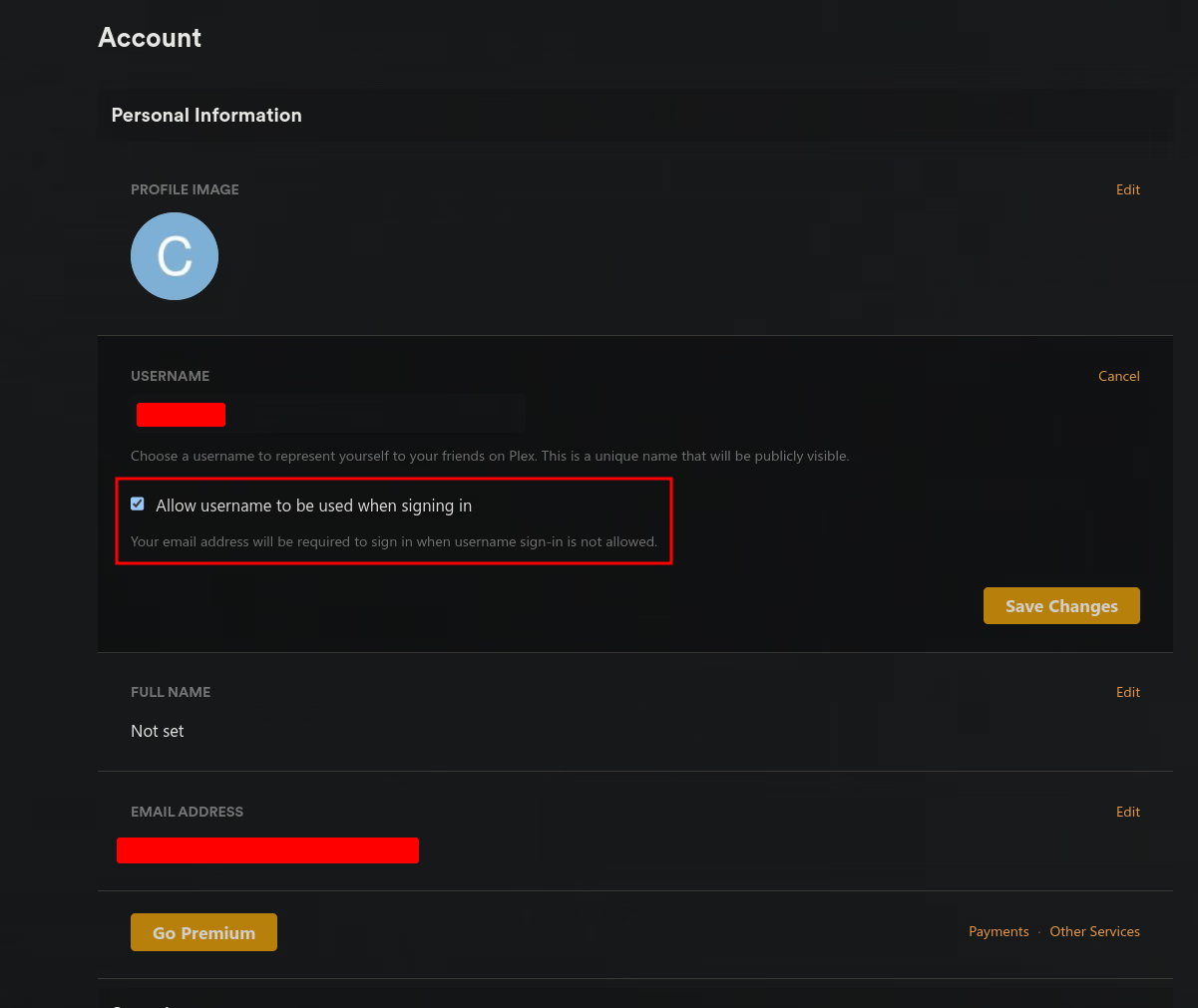
Make sure that the "Allow username to be used when signing in" is checked.
- Go to plex.tv and sign-in
- Go to Settings -> Account
- Click on the username and the below option will appear
- Make sure it's checked and then click "Save Changes"
Use Plex's official method:
- Sign in to Plex Web.
- Open a library and click a movie or show.
- Open the item menu and choose "View XML" (i.e., view the XML for the item).
- In the URL, copy the value after
X-Plex-Token=(stop before the next&).
This follows Plex's guide: Finding an authentication token / X-Plex-Token.
Note: This does not create a new token; it reveals an existing account token.
Reaparr method if you want to create a new token to share:
- Add your Plex account in Reaparr using your username and password,
- Open that Plex account in Reaparr.
- Click "Generate Token" to create a new token you can share.
Yes and no.
Yes, in the sense that they can always cross-reference the IP connecting to the server which is using a lot of bandwidth with a PlexAccount that has access to their server.
No, in the sense that programs such as Tautalli, etc. will not trigger.
Take this with a grain of salt, as this might change at any moment and please make an issue if you are aware of some vulnerability in Reaparr.
Most likely not, but I do not own Plex, so I can't give guarantees. If you want to be extra safe then make a dummy account, and then use that account to request access to various Plex servers. Your real account will then never be exposed to a Plex server its downloading from.
Troubleshooting
This is typically a file permission issue with your mounted download directory. Reaparr runs as a specific user inside the Docker container and needs proper permissions to write to your host's file system.
Solution: Set the correct PUID and PGID environment variables in your Docker configuration.
- Find your user's PUID and PGID by running this command on your host system:
id username
Replaceusernamewith your actual username. This will output something likeuid=1000(username) gid=1000(groupname). - Add these environment variables to your Docker configuration:
- Docker Compose: Add to your
environment:section:environment: - PUID=1000 - PGID=1000 - Unraid: Set these variables in the Unraid template editor (usually pre-configured, but verify they match your user).
- Docker CLI: Add
-e PUID=1000 -e PGID=1000flags to yourdocker runcommand.
- Docker Compose: Add to your
- Verify folder permissions: Ensure the mounted directories (especially your download path) have read/write permissions for the user/group you specified:
sudo chown -R 1000:1000 /path/to/your/download/folder
sudo chmod -R 755 /path/to/your/download/folder
Replace1000:1000with your PUID:PGID and/path/to/your/download/folderwith your actual download directory path. - Restart the container after making these changes.
This ensures Reaparr runs with the same permissions as your user, allowing it to read and write files in mounted directories. For more details, see the Linux Server documentation on PUID and PGID.
- Make sure the server is online, images are loaded directly from the Plex server.
- Make sure you disable ad blockers like uBlock Origin.
- Make sure to disable extensions like Dark Reader.
- Firefox can sometimes block non-https connections. Press F12 in Firefox and watch the console to verify this.
Officially, all chromium based browsers such as Google Chrome and Ungoogled Chromium and Firefox.
Brave works as well, just disable the Brave shields functionality on Reaparr. See this issue.
It "should" however work with all browsers, except ancient ones like Internet Explorer and trash ones like Safari. Don't expect support for either of those.
No it should be almost the same background you see on this website. Make sure you're not running an extensions such as Dark Reader that makes the websites you visit dark
Logs are stored in mounted Docker volume /Config/Logs.
- Inside the app data directory (container path is
/Config). - When using Docker, map a host folder to
/Configto persist settings, database, and logs across updates.
Community & Support
Check the Contributing page to see what you can do to help!
GitHub Sponsors is available:
- Use the GitHub Sponsors page: github.com/sponsors/Reaparr
- Click the "Sponsor" button on the Reaparr repo to make a one‑time or monthly contribution.
Other ways to support:
Yes, I (JasonLandbridge) work as a freelance Vue.js/.NET developer, and I'm always looking forward to the next awesome project. But if you're secretly hoping for more updates on Reaparr, then you might not want to hire me ;-)